Find out whether your vehicle needs recall work
- Find the full 17-character VIN and enter it in the federal recall lookup.
- An open result means recall work remains. Zero means the lookup found no unrepaired recall within its coverage.
- If the search says zero, keep any driving, parking or other interim restriction from a notice addressed to your vehicle.
- Obey any “do not drive” or “park outside” instruction immediately.
We’d start with the VIN because a recall can affect some builds of a model and leave others out. A year, make and model search finds general announcements; it cannot tell you whether this particular vehicle still needs work. This search covers vehicle recalls; car seats and tires require separate searches.
A safety recall identifies a defect or rule violation and the vehicles covered by the repair campaign. The federal search reports recalls that remain unrepaired for the VIN you enter. Once a repair is recorded as complete, that campaign no longer appears as open, so keep any notice beside your result if the two seem to disagree.
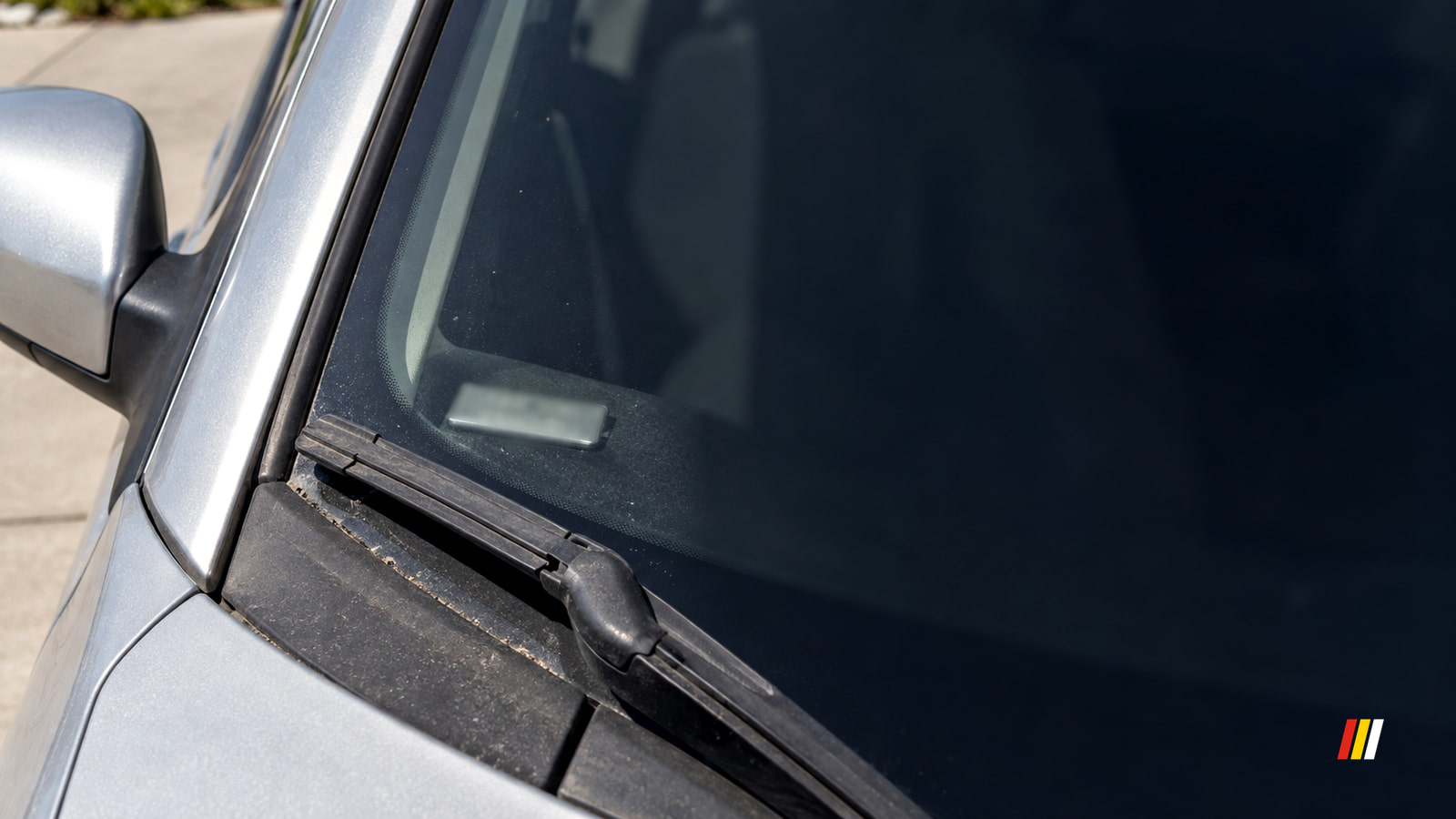
Copy the VIN and run the search
A modern U.S. vehicle has a unique 17-character VIN. On a car, truck or SUV, look through the lower driver-side windshield or at the label inside the driver-side doorjamb. A motorcycle’s VIN is commonly stamped on its frame. The registration and insurance card give you another copy to compare.
- Copy every character from the vehicle, then compare it with the registration or insurance card. If the copies disagree, read the number on the vehicle again before searching. A photo can help with a hard-to-read character.
- Open NHTSA’s free recall search (opens in a new tab), select the VIN search and enter the full 17 characters. The result should identify your vehicle and show open recalls or zero unrepaired recalls.
- If the entry is rejected, recount the characters and compare them with a second copy. Modern VINs do not use the letters i, o or q; change a lookalike character only when the other copy confirms it. Enter the corrected VIN and look for a vehicle-specific result.
- Compare the vehicle details in the result with the vehicle in front of you. If they do not match, return to the VIN on the vehicle and search again. If the verified VIN still gives no usable result, the manufacturer’s recall team can check it directly.
For a used-car purchase, copy the VIN from the vehicle and run this search before you buy. The seller’s paperwork is useful for comparison, but the number on the vehicle settles which VIN you need to investigate.
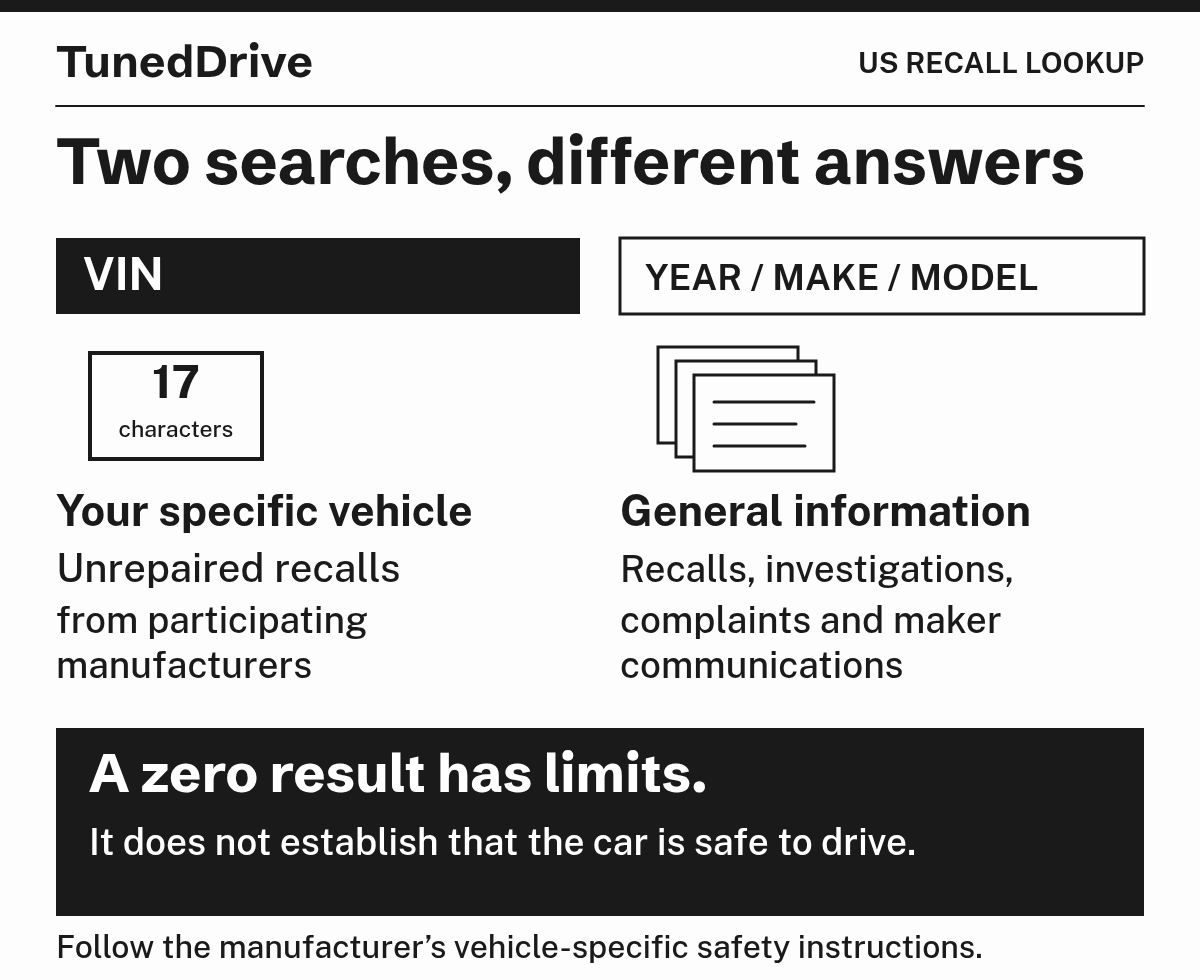
Read what the result actually says
An open result points to unfinished recall work. Read its campaign identifier, affected component and remedy description together: the identifier names the campaign, while the other details tell you what is being fixed. Save the result with the VIN so the service department can find the same campaign.
| Result | What it means | Your next move |
|---|---|---|
| Open or unrepaired recall | This VIN has recall work that remains open. | Save the campaign identifier and arrange the remedy with an authorized dealer for the make. |
| Zero unrepaired recalls | The lookup found no open recall within its coverage at the time of the search. | Keep a vehicle-specific notice and investigate any mismatch before treating the question as settled. |
| Rejected VIN or unusable result | The search has not established this vehicle’s recall status. | Compare all 17 characters with the vehicle and paperwork, then retry the VIN search. |
A zero result does not list repairs already completed, and it cannot show which past campaign was fixed. It can change when a new recall is announced or additional affected VINs are added. The lookup also generally leaves out safety recalls more than 15 years old unless a manufacturer supplies longer coverage.
Your notice and the VIN result disagree
If a notice names your vehicle but the search says zero, first compare the notice’s VIN with the VIN on the vehicle. Give the manufacturer’s recall team both that VIN and the notice’s campaign identifier, and have it confirm whether the campaign applies. Follow the notice’s interim instructions while the status is resolved. We’d repeat the VIN search as a newly announced recall’s affected-vehicle list is populated.
If you saw only a model-wide announcement, the affected group may be narrower than the name and year suggest. Match the announcement’s campaign identifier against any open campaign in the VIN result; the model name and year alone do not identify the affected build. If a previous owner already had the repair, the federal open-recall search will omit it; a completed repair order or the dealer’s campaign record can establish what happened.
For a recall more than 15 years old, use the manufacturer’s VIN lookup if it reaches further back, or have its recall team search the campaign record. An issued recall does not expire merely because the federal public search stops displaying it. That search-history limit is separate from the vehicle-age rule for a legally required free repair.
The federal result can also omit recalls involving vehicles built for another market and some small or specialty manufacturers. Give the manufacturer or its U.S. representative the VIN and any notice or campaign identifier, then get the exact vehicle’s affected and completed status. An empty federal result cannot settle a recall outside its coverage.
Get the open recall repaired
Read the remedy status tied to your VIN to see whether the repair is ready. If it is, schedule the recall repair using the VIN and campaign identifier, and keep following any interim precautions until the work is complete. A pending remedy means the permanent fix is still being developed or released; the manufacturer can send an interim notice before the repair becomes available.
Eligible recall parts and labor normally cost you $0 at the authorized dealer. The recall follows the vehicle when ownership changes, and an expired ordinary warranty does not turn eligible recall work into a paid repair. Under the federal free-remedy rule (opens in a new tab), the no-charge duty generally applies unless the first purchaser bought the vehicle more than 15 calendar years before the manufacturer gave its statutory notice to NHTSA or NHTSA issued its order, whichever came first. It is not measured from the model year or the day you search.
For a vehicle beyond that age limit, the manufacturer can still provide the recall remedy free. Confirm the offer for your VIN before agreeing to a charge. Recall work and unrelated maintenance or repairs on the same visit are separate: request a written explanation of proposed paid work and do not authorize a charge described as recall work until its eligibility and reason are resolved.
If your notice says do not drive
Use the instruction for your VIN and campaign to decide what happens while you wait. An open recall without a driving restriction calls for the notice’s own interim precautions; a vehicle-specific “do not drive” instruction changes the plan immediately. A zero search result does not cancel a notice addressed to your vehicle.
Give the authorized dealer or manufacturer’s recall team the VIN, campaign identifier and vehicle location. Ask what towing, mobile repair or temporary transport that campaign provides before moving the vehicle. Those services are available for some campaigns, but a recall does not automatically include a loaner.
If your notice says park outside
An outdoor-parking instruction applies to the vehicles named in that recall, including while they are switched off. Follow the notice’s other interim precautions until the remedy is complete.
Tell the dealer where the vehicle is parked when arranging the remedy. If the notice also says not to drive, leave it there and arrange transport or mobile service through the campaign.
The repair is delayed or still shows open
If the dealer cannot book the work, establish which delay you have. A pending remedy means the permanent repair has not been released for your VIN, a parts backorder means the repair exists but replacement parts are unavailable, and a lack of appointments is a separate scheduling delay. Give another authorized dealer or the manufacturer’s recall team the VIN and campaign identifier, and request the remedy status, expected availability and current interim instructions. A confirmed appointment or specific repair plan gives you a next step while you keep following the notice.
If a dealer refuses the campaign repair or proposes a recall charge, request the reason in writing and have the manufacturer confirm eligibility for the exact VIN. Keep the notice, estimate, dealer name and dates. Do not authorize paid recall work while the charge is disputed.
After the work, get a completed repair order showing the VIN, campaign identifier, work performed and completion date. The Federal Trade Commission’s repair-order guidance (opens in a new tab) calls for a record describing the work done. If the public search still says open, have the dealer read its campaign record for your VIN and confirm whether the campaign is closed. The public result can lag while the repair is reported and processed. Use the repair order to identify the completed campaign because a later zero result lists no past repairs.
When a verified VIN still yields no usable result, a notice conflicts with zero, the repair cannot be arranged within a reasonable time, a charge remains disputed, or completion records still disagree, contact the manufacturer’s recall team with the VIN, campaign identifier and dealer record. For an unresolved delay, charge or VIN-status dispute, file a complaint or call NHTSA’s Vehicle Safety Hotline at 888-327-4236. If the campaign offers no transport, get a trip-specific tow quote before booking: a passenger car or light pickup tow with a $75 to $150 hookup and 10 billed miles at $2.25 to $5 per mile runs $98 to $200. Get an itemized quote before authorizing work outside the recall.
Stay ready for a new recall
Keep the address on your vehicle registration current so mailed recall notices can reach you. File a new vehicle-specific notice with the vehicle paperwork until its campaign is resolved.
Can I check for open recalls without the VIN?
Enter the license plate number and issuing state in the federal lookup when its plate search is available. Confirm that the result identifies your vehicle. If it returns an old or different vehicle, use the VIN instead and have the state DMV correct the plate record. Use the VIN for this vehicle’s open status because year, make and model results are general.
How often should I check for new recalls?
Search the VIN at least twice a year, before buying a used vehicle and after a new announcement. A previous zero result can change as recalls or affected VINs are added. You can also save the vehicle and VIN in the federal recall-alert app to receive related alerts.
Preferred source
See more TunedDrive on Google
Select TunedDrive in Google’s source preferences. It takes a few seconds and costs nothing. Our car news, reviews and fixes become more likely to appear in your Top Stories, and AI Overviews can mark them as preferred.
More in this category