Which dash cams get geofencing
- Applies to
- Selected VIOFO dash cams with compatible GPS hardware and firmware
- Safe zones
- Up to 3, named Zone 1, Zone 2 and Zone 3
- Low Power Impact Recording models
- T340 Series, T330 Series, A329S Series, A149 Pro Duo
- Full power-off models
- A329, A229 Ultra, A229 Pro, A229 Plus, A119M Pro
- Setup path
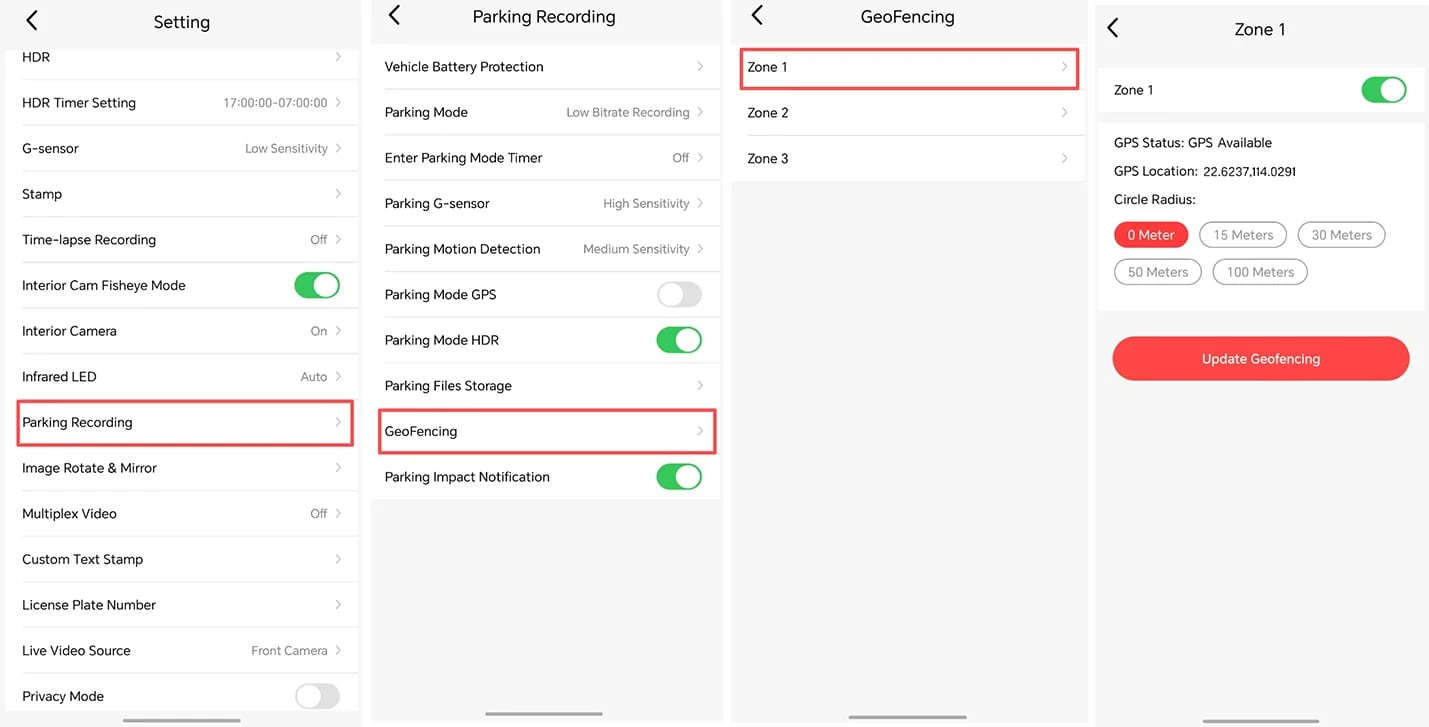
- Parking Recording > GeoFencing
VIOFO has announced a geofencing feature for its dash cams that changes how the camera behaves in parking mode once the vehicle is switched off (opens in a new tab). Normal driving recording is not affected.
Owners can save as many as three safe zones, labeled Zone 1, Zone 2 and Zone 3. The radius of each zone can be adjusted at any time, and saved zones can be edited or deleted through the Parking Recording > GeoFencing menu. The feature is meant to reduce battery drain and the amount of parking footage stored.
Behavior inside a zone depends on the model. The T340 Series, T330 Series, A329S Series and A149 Pro Duo can either shut down or use impact recording within a saved zone, VIOFO says. The A329, A229 Ultra, A229 Pro, A229 Plus and A119M Pro shut down completely inside the zone. Geofencing is limited to selected models that have compatible GPS hardware and firmware, and older A119, A129 and A139 models do not support it.
How to set it up
VIOFO says owners should wait for a stable GPS connection before saving a zone, because weak GPS at a parking entry can stop geofencing from activating. When GPS is unreliable, the camera falls back to its normal parking mode setting. After configuring zones, VIOFO advises testing geofencing several times.
VIOFO says setup is available through its VIOFO Dashcam App or the camera menu on screen-equipped models. Compatible parking power is required; VIOFO lists a hardwire kit and supported camera battery packs as options. The company says geofencing is unnecessary for cameras powered solely by a cigarette-lighter cable.
If your model is on the supported list, set your zones while parked with a clear GPS signal and test them before relying on them.